aPS3e PS3 EMULATOR FOR ANDROID
APS3e is made solely for gamers who want to play PS3 titles without having the actual console. The emulator
imitates the PS3’s system architecture, translating gaming instructions in an android-friendly manner.
| Name | APS3e |
| Category | Emulator |
| Developer | APS3e INC |
| Compatible with | Android 7.0+ |
| Version | 0.5 (Latest) |
| Updated | Feb 18, 2025 |
APS3e emulator is your go-to tool to relive PS3 memories. It runs most of the PS3 titles smoothly. You can enjoy popular titles like GTA V, Demon Souls, The Last of Us, Assassin’s Creed II, Far Cry 3 and God of War Games, etc.,
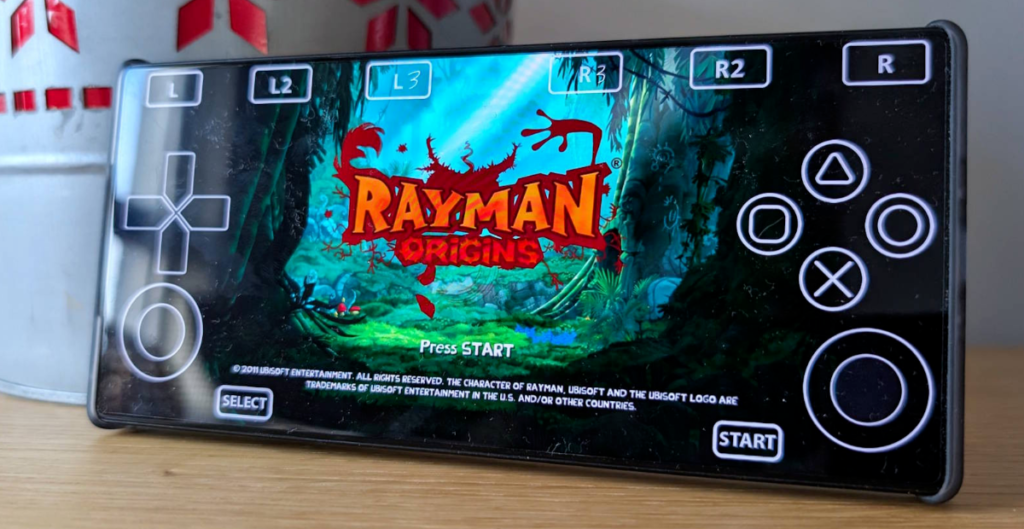
Hence, you can have hours of fun on your Android devices.
This emulator supports smooth gaming, taking mobile gaming to another level. You can experience console gaming without needing any additional hardware. It is the best way to enjoy the convenience and nostalgia.
Table of Contents
APS3e Emulator Features
APS3e is made solely for gamers who want to play PS3 titles without having the actual console. The emulator imitates the PS3’s system architecture, translating gaming instructions in an android-friendly manner. As a result, you can play the PS3 games on your smartphone.
You can use this emulator for various reasons. It is ideal both for novice and professional players. It has many incredible features, which we will discuss now;
1. One of the main features of this emulator is the ability to run PS3 games on Android. You can play many of the famous PS3 games on your Android devices.
It is kind of having a portable console to play interesting games. Plus, it saves you from investing in the actual console.
2. The app works smoothly and runs many PS3 titles on the small screen. You can expect a high-gaming functionality with minimum battery consumption on the go.
3. The APS3e emulator provides an uninterrupted gaming experience, ad-free.
4. It is a community-driven app; therefore, it has frequent updates and feedback. The developers actively engage in the process of introducing updates and other improvements.
5. The support for external controllers makes the game more enjoyable. It provides a console-like experience on your Android device.
APS3e System Requirements
| OS version | Android 7.0 (or higher) |
| CPU | Octa-core 2.0+ Ghz |
| Ram | 6 GB (8 GB recommended) |
| Free storage | 64 MB |
| Root | Not required |
Download and Setup APS3e Emulator
- First, click the download button to download and install the APS3e emulator on your Android device.
- Download PS3 firmware. It is vital for running the emulator.
- Once downloaded, you can now launch the APS3e emulator on your device.
- Tap on add firmware in the emulator settings.
- Locate the firmware file where you downloaded the PS3 firmware and import it.
- Now, load your PS3 game files into the ApS3e emulator.
- Finally, you can enjoy playing PS3 games on the go.
APS3E Settings
APS3e Pros & Cons
Pros
- It is a reliable PS3 emulator that supports many PS3 titles.
- The game has high-quality graphics to enhance user experience.
- The emulator supports smooth gameplay and customizable controls.
- It allows the game to save and load game states.
- You can enjoy the support of external controllers.
Cons
- It works well on high-end devices.
- You need both BIOS and ROM files.
Frequently Asked Questions
It is an Android emulator that supports PS3 games without the console. Hence, it allows you to play PS3 games on your mobile device, allowing you to have an enjoyable gaming experience.
Yes, it is safe to download APS3e. Make sure you download it from reliable sources only. That is how you minimize the potential security risks.
It does not support all PS3 titles. However, it allows playing a wide range of PS3 gaming titles. With this emulator, you can play the PS3 titles on Android.
Yes, the basic version is free, and you don’t have to pay anything.
Final Remarks
APS3e emulator is an ideal PS3 emulator that runs titles smoothly on Android devices. It allows you to have a console-like gaming experience on your phone. The app is compatible with the majority of the titles. Likewise, it will enable customizable settings, performance optimizations, and external controllers for a seamless experience. So, download it now to have a fun PS3 gaming experience with this emulator.

Download & Play PlayStation 3 Game Today
| Version | v0.5 |
| Game Format | ISO, PKG |
| Graphics Support | Vulkan-compatible GPU |
Best Settings to Fix Graphic/Crash/Lags Etc
You May Also Need: APS3e Firmware